PLAYBOOK · 06 · CAPTURE WITHOUT TYPING · BY MARC KLEINMANN
Yousayitataredlight.It is a sorted list when you sit down.
How an idea you dictate at a red light files itself, sorts itself, and is waiting as a list when you sit down. Three parts, one rule, the four minutes it takes to build the capture, and the routine brief the whole thing turns on.
Read time ~9 minDifficulty BeginnerStack Claude on your phone · one folder · one scheduled task
01 ·Context
The problem was never discipline. It was the typing.
The good idea always shows up at the worst possible time. Merging onto the highway. Walking the floor. Three minutes before a call. And the friction of stopping to write it down is exactly high enough that you do not.
Here is the part nobody admits about the task manager they bought: they stopped opening it. Not because it was a bad app. Because capturing a thought in it costs too much. Stop what you are doing, unlock the phone, find the app, pick a list, type the thing, set a due date you will ignore. Six steps to save one sentence. So the sentence does not get saved.
This is the build that removes it. You say one short phrase into the Claude app on your phone, and whatever you just handed it gets filed. A link, an article, a half-formed thought you dictated at a red light. It lands in one folder and sits there. Twice a day, on its own, a routine reads everything in that folder, works out what each item actually is, and leaves you a numbered list. You read the list with coffee and act on it.
02 ·Architecture
Three parts and one rule.
Three parts and one rule.
Part 01 · The captureIt files. That is all.
You say a short phrase into the Claude app. It takes whatever you handed it, a URL, a dictated note, a dropped file, and files it. That is the entire job. It does not read the link. It does not sort. It does not decide. Because the job is that small, it runs on the cheapest and fastest model available. Filing does not need your best thinker, it needs your quickest one.
Part 02 · The inboxA folder that does nothing.
One folder that holds things and does nothing else. No sorting, no notifications, no priorities, no due dates. It sits there and collects. This is the part people skip, because a folder that does nothing feels like a missing feature. It is the opposite.
Part 03 · The routineIt wakes up on a clock.
Twice a day, on a clock, a scheduled task wakes up on its own, reads everything in the inbox, works out what each item is, and leaves a numbered list. Nobody triggers it. This is the same move as playbook 04, Schedule Your Skill, pointed at a different job.
Then you verify. You read the list and fix anything it got wrong, in one line. That is the only part that costs you attention, and it costs about a minute.
03 ·Setup
What you build, and what you connect once.
The capture halfOne phrase, one folder.
You need a saved instruction, a skill, that fires on one short phrase and writes what you gave it into your inbox folder. Two things matter about the phrase: it has to be short enough to say one-handed, and it has to be a phrase you would never say by accident. Do not make it clever. Make it fast.
The modelThe cheapest one you have.
Set this one to the cheapest, fastest model you have access to. This is the hire-the-right-model idea from playbook 01 pointed at the smallest job in your operation. A capture is filing. Paying your best model to file is like paying a surgeon to alphabetize.
The inboxResist the urge to structure it.
One folder. That is it. Resist every urge to give it structure. Subfolders, tags, and priorities all reintroduce the decision you are trying to remove.
The routine halfTwo times, picked deliberately.
A scheduled task that runs twice a day and reads the inbox. Pick your two times deliberately: one early enough that the night's captures are sorted before you sit down, one midday so the morning's captures do not wait until tomorrow. Mine runs at 04:45 and 12:45.
Where it runsYour phone, and a clock.
The capture is in the Claude app on your phone, so it works wherever you are. The routine is a scheduled task. Note honestly: if your scheduled task runs on your own machine, it only fires while that machine is awake. A 04:45 run on a sleeping laptop silently does not happen. A midday run is partly insurance against exactly that.
What you connect onceWherever the folder lives.
Wherever the inbox folder lives, so the capture can write to it and the routine can read it. That is the only connection the base build needs.
04 ·Decisions
Four calls you make when you build one.
Decision 01Voice, or typing.
Both work; voice is the reason it survives. Typing is fine at your desk and useless in the car, and the car is where the ideas are. If you build this and only ever type into it, you have built a slower notes app.
Decision 02One inbox, or one per topic.
One. Every extra inbox is a decision at capture time, which is the thing you are removing. Sort later, in a batch, or let the routine do it.
Decision 03How often the routine runs.
Twice a day is the sweet spot. Once means the morning's captures wait until tomorrow. Every hour means you are back to being interrupted by your own system, and the sorted list stops being a thing you read and starts being a thing you dismiss.
Decision 04Cheap model, or good model.
Cheap for the capture, always. For the routine, go a step up: it is doing the actual reading and judging, and that is worth paying for. Two different jobs, two different hires.
05 ·Runbook
Build the capture yourself. Hand off the routine.
The capture half you can build yourself, right now, in about four minutes. There is nothing to install and nothing to download. The routine half is the part you hand to a builder, or to Claude directly, as a short brief. Here is both.
Part 01Build the capture yourself.
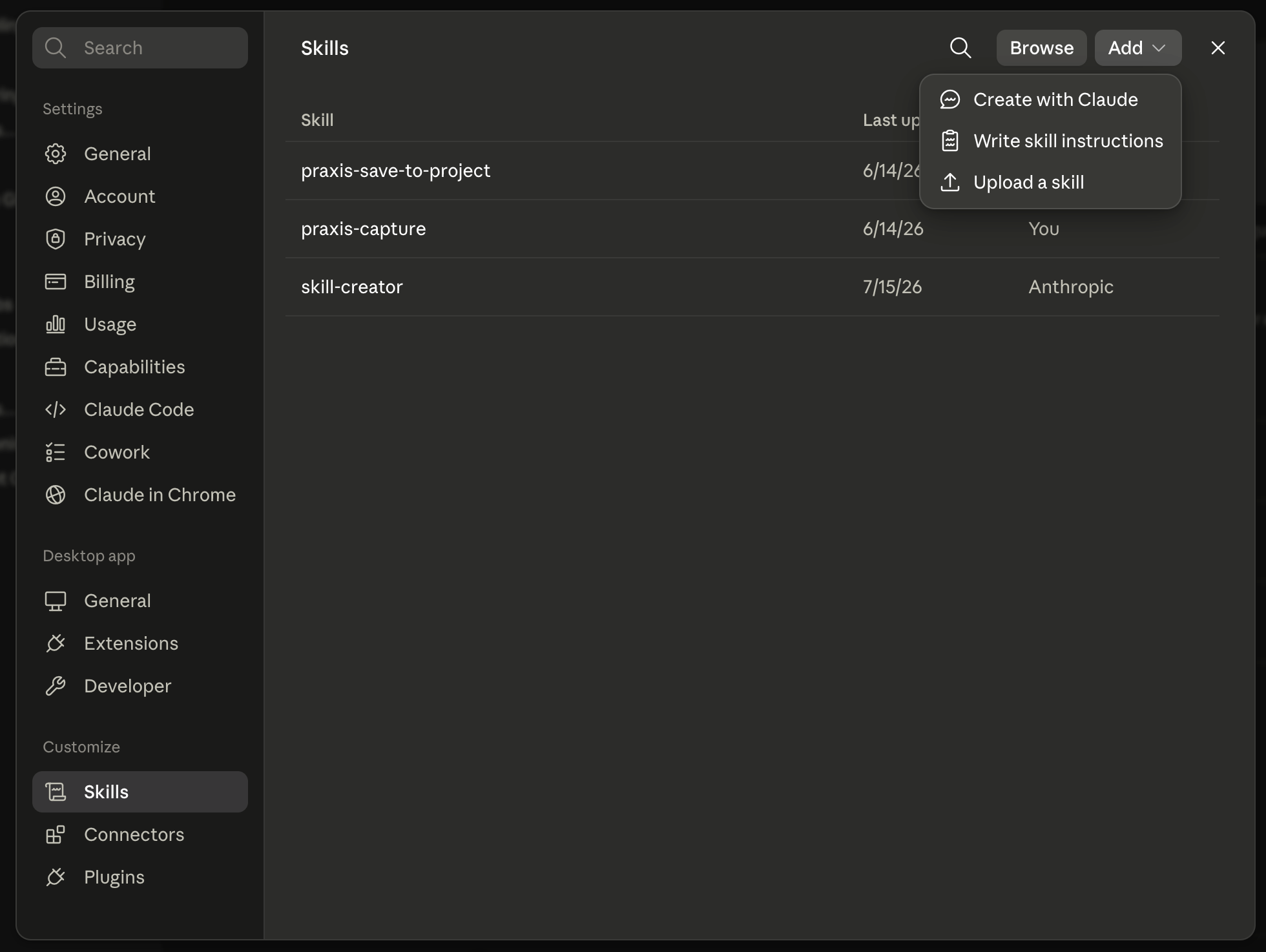
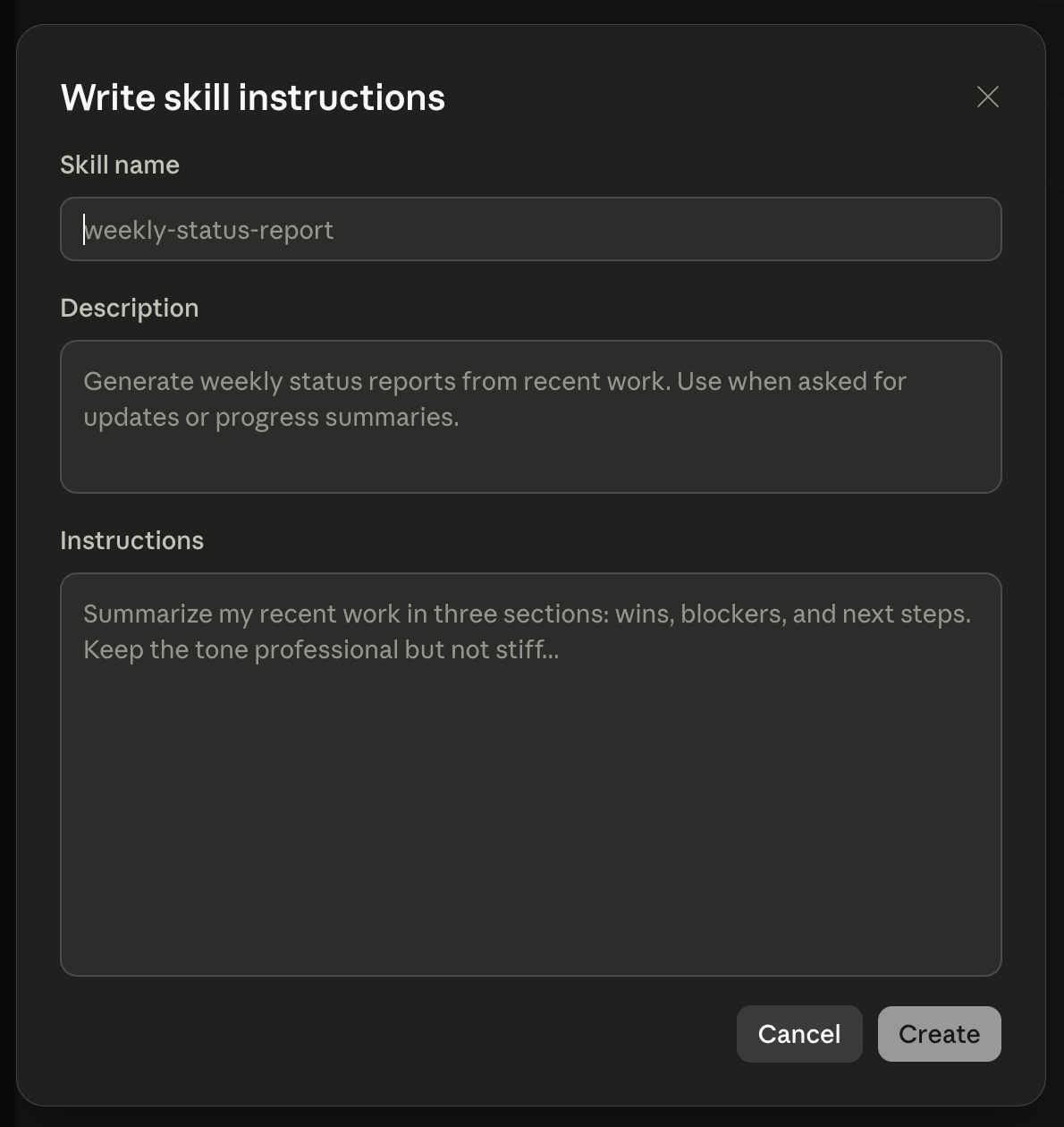
In Claude, open Settings, then Skills, then the Add button, then "Write skill instructions." You will get a form with three fields. That is the whole setup. No files, no downloads, no terminal.
01Settings, Skills, Add, Write skill instructions. That is the whole path in.
02Three fields. That is the entire setup.
Fill the three fields with the three boxes below, press Create, and it is live. Then say your trigger phrase in any Claude chat, on your laptop or your phone, and it files.
skill form · name
capture-to-inbox
skill form · description
Capture a URL, a note, or a dictated thought into my capture inbox. Use when I
say "send this to inbox", "add this to inbox", or "capture this". Files the
item and nothing else: does not read it, sort it, classify it, or decide
anything about it. Not for saving a whole conversation.
skill form · instructions
Take whatever I just handed you and file it. Nothing else.

WHAT TO ACCEPT: a URL, a note I typed or dictated, a file I dropped in, or any
combination of those.

WHERE TO PUT IT: write one file into my capture inbox folder at
[YOUR FOLDER PATH]. Name it with the date and time so it sorts on its own,
for example "Chat Jul 15 2026, 11 12 37".

WHAT TO WRITE: the URL on its own line, if there is one. My note verbatim, if
there is one. Do not summarize it. Do not tidy it up. Do not add your own
commentary.

WHAT NOT TO DO: do not open the link. Do not sort, tag, or classify. Do not
ask me which folder, which project, or how urgent. If you are about to ask me
a question, you have already failed.

WHEN DONE: reply with one line. Name the file you wrote and say when the next
sort runs. Then stop.
One thing to change before you paste it.[YOUR FOLDER PATH] is the only edit. It is wherever your inbox folder lives, and Claude reaches it through a connector you turn on once: Dropbox, Google Drive, whatever you already use. Mine points at a folder in Dropbox. Connect the one you have, then put its path in.
Part 02Hand the routine to a builder.
The routine is a scheduled task, not a form, so this half stays a brief. Hand it to whoever builds your skills, or to Claude directly. It is a complete spec.
routine brief · the sort · steal this
THE JOB: Sort my capture inbox and hand me a list.

WHEN IT RUNS: twice a day, 04:45 and 12:45. Nobody triggers it. [Pick your
own two times. One early enough that the night's captures are done before
you sit down, one midday so the morning's captures do not wait until
tomorrow.]

WHAT IT READS: everything sitting in the capture inbox. Nothing else.

WHAT IT DOES WITH EACH ITEM: work out what it actually is.
- For a link: read the page and say in one line what it is and why I might
  have kept it.
- For a dictated note: clean up the transcription without changing what I
  meant. Do not improve my idea. Do not expand it.
- For anything you cannot identify: say so plainly. Do not guess.

WHAT IT HANDS BACK: one numbered list. For each item: what it is, one line
on what it is about, and where it should go. Numbered, so I can act on one
by saying its number back to you.

DUPLICATES: if I captured the same thing twice, and I will, show it once.

THE HARD RULE: it sorts and proposes. It does not file anything into its
final home, delete anything, or act on anything until I say so.

WHEN IT IS DONE: leave the list where I will see it with coffee. Do not
notify me at 11pm. The whole point is that it waits for me, not the
reverse.
06 ·Gotchas
The five that catch everyone.
Watch-out 01
Sorting at capture time.
The one that will kill your build, and it killed mine for two weeks. My first version sorted each item the instant I captured it. It felt smart. It turned every capture back into a decision, which is the exact friction the build exists to remove, and I stopped using it. Slow it down. Capture files, the routine sorts, and those two never meet.
Watch-out 02
An inbox with opinions.
If your folder has subfolders, tags, or a priority field, you have not built an inbox, you have built a task manager with extra steps. It holds things. That is the feature.
Watch-out 03
Expecting images to just work.
The capture will file a screenshot without complaint, but making an image genuinely useful later takes a separate enrichment pass that reads the picture and writes down what is in it. That is its own build. Do not assume it is included.
Watch-out 04
A trigger phrase you say by accident.
If your phrase is close to something you say in normal conversation, you will file things you did not mean to file. Pick a phrase with a verb and a destination in it.
Watch-out 05
Scheduling it before it works by hand.
Same rule as any scheduled skill. Run the sort manually a few times on a real inbox first. A schedule runs your build every day exactly as it is, flaws and all. Prove it, then set it loose.
07 ·What's next
Capturing one idea saves you one idea. The pattern is bigger.
Capturing one idea saves you one idea. The pattern is bigger than that.
Next 01
Enrichment.
Once the sort is reliable, add a pass that goes deeper on what it filed: pull the full article behind a link, read the screenshot, transcribe the voice memo properly. The sort tells you what a thing is; enrichment tells you what is in it.
Next 02
Routing.
Right now the routine proposes where each item should go and you approve. The next rung is letting it file the obvious ones itself and only surface the judgment calls. Note the order: you earn that by watching it be right for a month, not by turning it on.
Next 03
One inbox for everything.
The same shape takes email, meeting transcripts, and forms. Anything that arrives, lands in one place, gets read on a clock, and comes back to you sorted.
You do not start there. You start with one dictated thought at a red light that is still there when you sit down.